In-house legal intake software that gets every request to the right person
Legal requests reach your team from everywhere: email, chat, a quick word in the hallway, a contract forwarded at 5pm with "can you just look at this?" Xakia is in-house legal intake software that gives the rest of your business one place to ask. Your legal team gets every request in one list, with the details it needs, and can pass each one to the right person. Clear rules handle the routing, and AI takes on the heavy reading.
What is legal intake and triage?
Legal intake is how an in-house legal team receives requests from the rest of the business. Legal triage is what happens next: deciding who handles each request and whether it needs a lawyer at all. Together they're often called a legal front door. Some teams call the tool a legal ticketing system or legal request management. Whatever the name, the idea is one clear way in for every request, so nothing gets lost in someone's inbox. Without it, requests arrive missing half the information legal needs, and when the General Counsel asks how many came in last quarter, the honest answer is a guess. Our blog on why intake matters for corporate legal departments goes deeper on the process.
Rules where you need certainty, AI where it saves time
We pair clear, rules-based intake with AI where it does the most good, so intake stays simple, powerful and affordable.
When a request goes to one person and not another, someone will eventually ask why. In Xakia, your team sets the rules for who picks up a request and which ones never need legal. The person who receives a request can see which rule sent it to them.
Coming soon
Xakia AI will give your team an overview of each request, covering the key dates, the documents attached and the actions needed, so you don't have to sift through the details to find what you need. Your team still makes the calls, and we never train AI models on your data.
One place for the business to ask legal
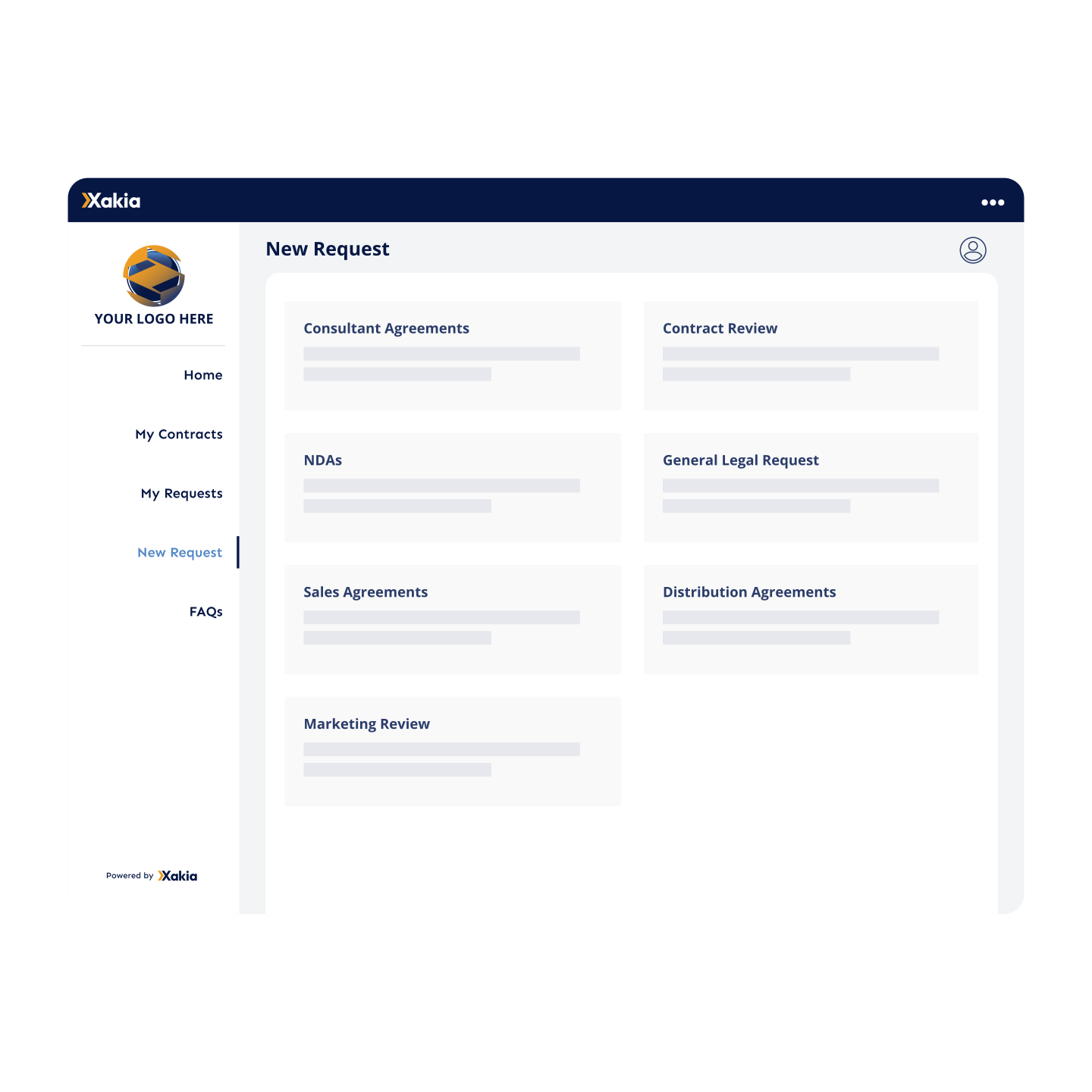
Most people outside legal don't know which lawyer to email, so they email whoever they spoke to last. Xakia gives them a legal request portal instead, with your company's logo and colors, so it looks like your own.
When they start a new request, they pick the type of help they need, such as an NDA, a contract review, a sales agreement or a marketing review. It tells your team what kind of work it is before anyone opens it.
Not everyone needs a login. You can also put your request forms on your intranet, where people fill them in with just their name and email address. They won't be able to track the request from there, though.
Request forms that get the full story the first time
"Can you send me the agreement?" "Which company is this with?" "When do you actually need it?" Each one means waiting on a reply before legal can get started.
With Xakia, your legal team builds its own request forms by dragging questions onto a page. You choose which questions are required and add a short tip under each one so people know what to write. You can also:
ask for what you need, including the date it's needed by, the value involved, the company it relates to and any files
fill in some answers ahead of time, such as the type of work, so routine requests arrive already sorted
show or hide questions based on earlier answers, so people only see what applies to them
offer the form in English, Japanese, Spanish or French
Contract requests work the same way. When your team accepts one, details from the form, such as the contract itself and its key dates, carry straight into your Contract Records. Nobody types the same information twice.
For high-volume documents like NDAs, Xakia can create the document for you. It fills a template with the form answers and produces a Word or PDF file, which goes straight back to the person who asked or to legal for a check first.
Answer routine questions before they become requests
Some requests never needed a lawyer. The answer is already in a policy, or the question belongs to another team.
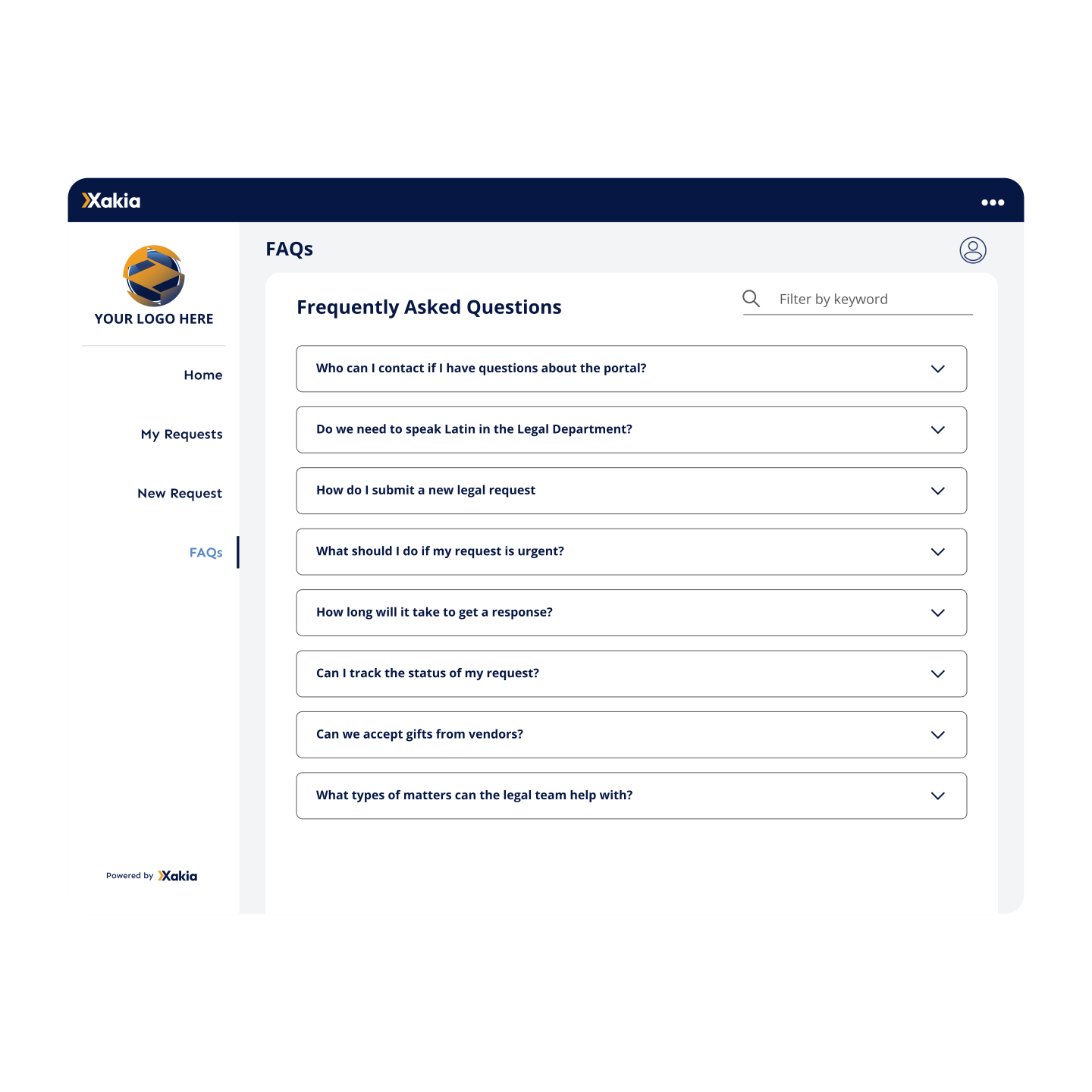
Your legal team can publish answers to the questions it gets every week on a FAQ page in the portal. People can browse by topic or search by keyword.
You can also set rules that catch requests legal doesn't need to handle. If someone's answers match a rule, for example a category another team looks after, they see a message telling them where to go instead. Xakia still logs the request, so it shows up in your reports.
How do in-house legal teams triage legal requests?
Every request lands in one shared list. Your team reads the answers and any attached files, then assigns it to the lawyer who'll handle it. Once assigned, the request becomes a Matter your team tracks through to completion.
Before you assign it, a workload view shows new requests next to what each person on your team is already working on. If a request isn't one for legal, you can turn it down with a reason and decide whether to let the person know.
Need to find an old request? Smart Search looks through requests and the documents attached to them.
Send requests to the right person automatically
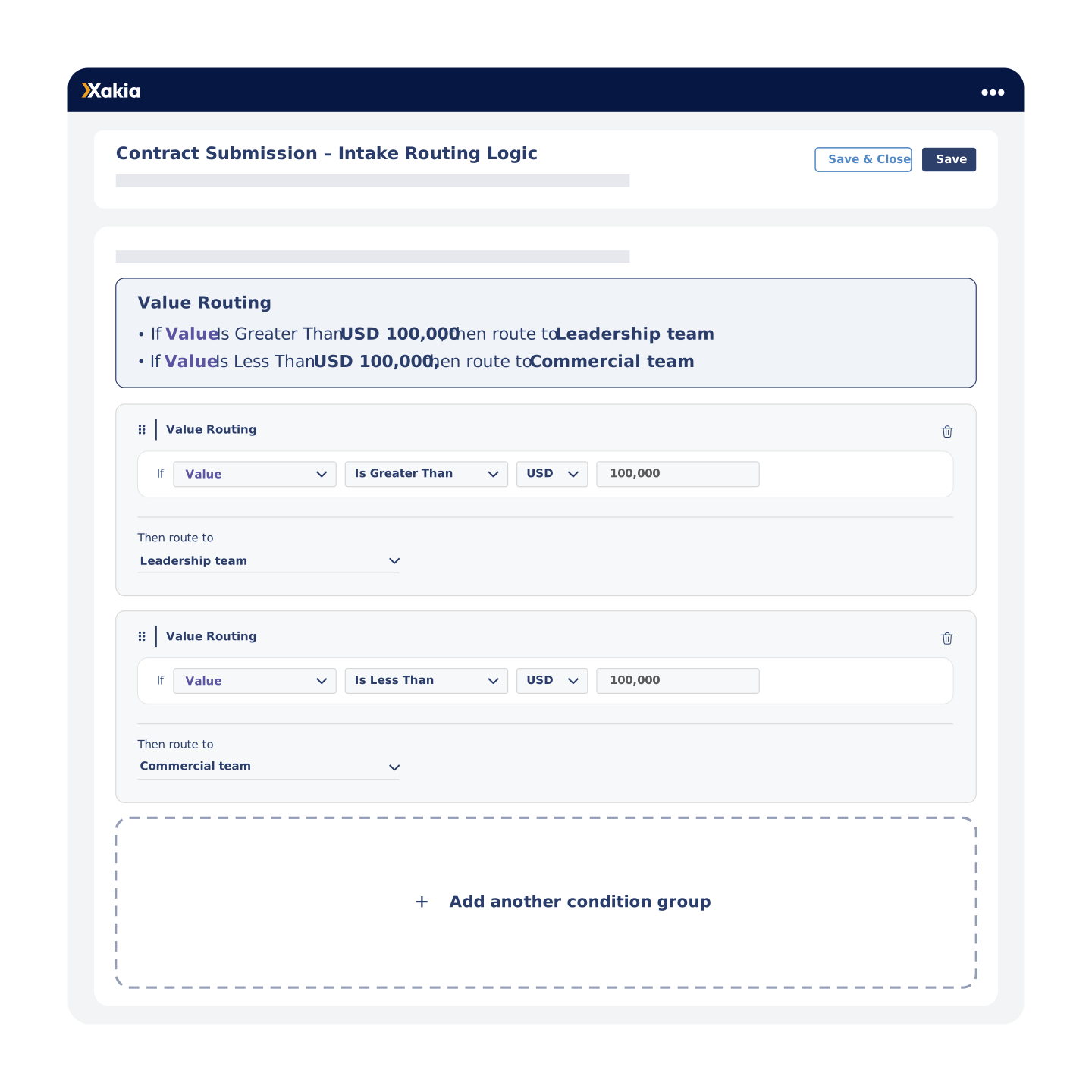
Sorting requests by hand works until the list gets busy. Xakia can read the answers on each form and send the request to the right person or team for you, based on rules you set, such as how much a contract is worth. Because you set the rules, you always know why a request went where it did.
A summary at the top reads each rule back in plain English, so you can check it before you save. If a request still lands with the wrong person, your team can move it while it's waiting.
People can check progress without chasing legal
"Any update on my NDA?" is a question your team shouldn't have to answer by email.
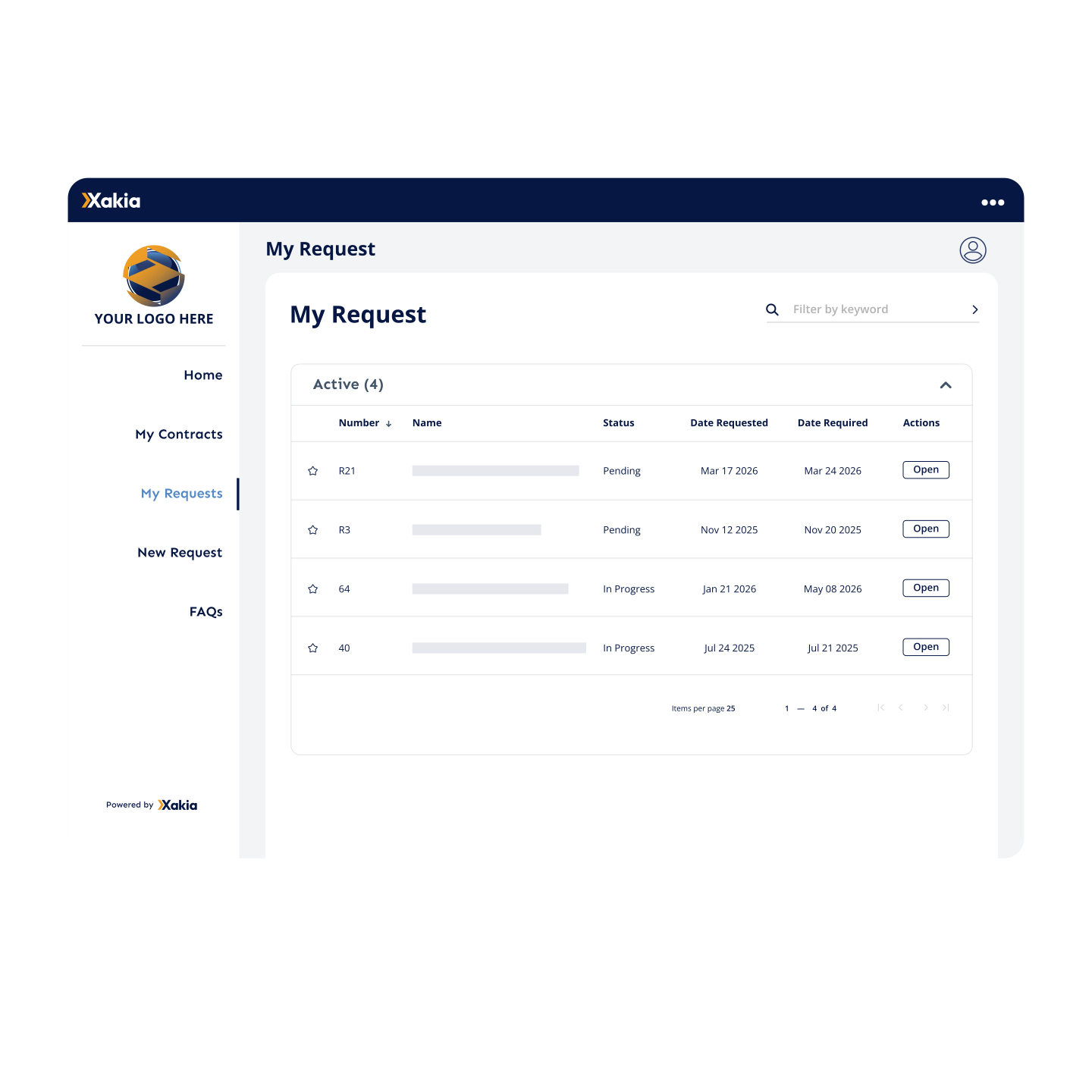
In the portal, people see every request they've sent, its status and the date they need it by. Inside each request, they can see who's working on it, read notes your team has chosen to share, swap documents and message the legal team directly. Nothing is shared automatically. Your team decides what they see.
They also get an email as their request moves along, and you choose which emails each form sends.
Their contracts, in the same place
The portal also lists every contract a person owns, asked for or follows. Opening a contract shows details like its value, start and end dates, the other party and its key terms.
See what's happening across the Legal Department
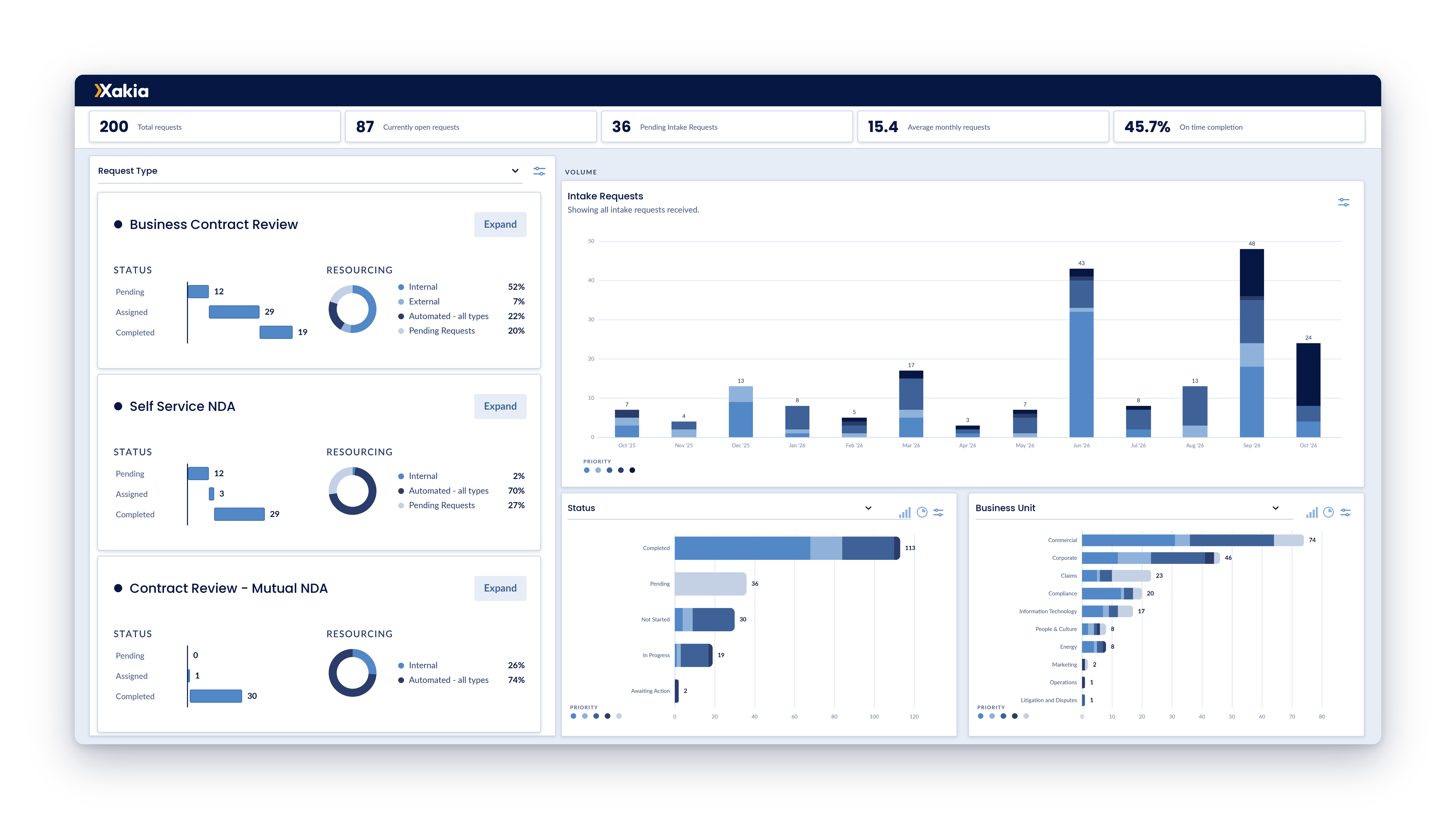
When the General Counsel asks how many requests came in this quarter and whether the team is meeting deadlines, the answer shouldn't take a week of spreadsheet work. Xakia's Intake Dashboard builds it from the information your request forms already collect.
You can break requests down by type, category, the part of the business they came from, or risk. The dashboard also shows:
how many requests were finished on time each month, and how many ran late or are still open
how much notice the business gives legal, which helps when everything arrives marked "needed tomorrow"
how much work your team handles itself, sends to outside lawyers, completes automatically or still has waiting
Filter by date and download what you see as a PDF for your next leadership update. For ideas on what to report, read our guide to legal dashboards for in-house teams.
Customer story
When using Xakia, average days to completion [of legal requests] reduced by 73%.
Some commonly asked questions about our legal intake & triage software
Xakia is cloud-based legal matter management software built specifically for in-house legal teams. It brings your matters, intake, spend, contracts, documents, and reporting into one place — so your team spends less time chasing emails and spreadsheets, and more time doing actual legal work. Founded in 2016, Xakia supports teams of all sizes across the globe.
Xakia covers the full stack for in-house legal teams: matter management, legal intake & triage, spend management, external counsel management, contract lifecycle management, legal project management, document storage, and analytics & reporting. Everything talks to each other, so you get one source of truth instead of five different tools.
No IT degree required. Xakia is cloud-based, so there's nothing to install. Most teams are up and running within days, not months. The interface is designed to be genuinely intuitive i.e. your team won't need a training course to figure it out.
Without a structured intake process, legal requests arrive through email, Teams or Slack, text, hallway conversations, and spreadsheets — and things slip through the cracks. A legal intake system gives every request a consistent path: submitted, triaged, assigned, and tracked. The result? Faster response times, better prioritization, and a clear record of everything your team handles. Xakia customers see average days to completion drop by 73% after implementing legal intake.
The Internal Client Portal is a hub where your internal clients (think: sales, HR, finance) can submit legal requests, track progress, and find answers to common questions - without having to email the legal team directly. You customize the intake forms, set up an FAQ library that intercepts routine questions, and keep requestors in the loop automatically. It's available on all subscription tiers. There is no charge or limit to the number of internal clients accessing this portal.
Yes — legal intake and triage is included in every Xakia subscription, from the smallest team to the largest. No add-ons, no extras.
No! The good news is you can have unlimited internal business clients use the Internal Client Portal at no additional fee!
Please note:the Internal Client Portal is available on the Advance plan – you can view ourpricingto learn more.
Security is non-negotiable for legal teams, and it's one of our highest priorities. Xakia is certified compliant with ISO 27001, SOC 2 Type II, and HIPAA certified. We conduct regular independent security audits, and operate on enterprise-grade cloud infrastructure. You can request our security documentation at any time.
Yes — and we're building more. Xakia uses AI for contract redlining and contract summarization. We're continuing to expand our AI capabilities with a focus on things that genuinely save legal teams time, without compromising accuracy or security. Keep an eye on our product updates for what's coming next.
Xakia consistently rates highly for legal intake on G2, Capterra, and Software Advice — particularly for ease of use, fast implementation, and customer support. If you want to see how we compare, check out our reviews or start a free 14-day trial and decide for yourself.
Yes. You can build intake forms that match your team's workflows, with custom fields, conditional logic, and different form types for different request categories (e.g. contracts, employment, commercial). No two legal teams work the same way, so your intake forms shouldn't look the same either.
Trusted by in-house legal teams of all sizes, worldwide
Give the business one place to ask legal
See how requests look when they arrive complete and go straight to the right person. Simple to set up, powerful where it counts and affordable for your team.

.svg)




















.png)